> For the complete documentation index, see [llms.txt](https://help.fulfilleo.solvenium.com/llms.txt). Markdown versions of documentation pages are available by appending `.md` to page URLs; this page is available as [Markdown](https://help.fulfilleo.solvenium.com/data-mapping/update-order-tracking-from-json.md).
# Update order tracking from JSON
Fulfilleo enables you to sync tracking numbers and fulfill orders via your supplier's API.
If your supplier provides order tracking data through an API, you can use it to fulfill orders in Shopify. Typically, the data is shared in JSON format. Here’s an example of what the API response might look like:
```json
{
"order_number": "#4417",
"tracking_number": "1234567890",
"items": [
{
"sku": "SKU12345",
"quantity": 1
},
{
"sku": "SKU54321",
"quantity": 2
}
]
}
```
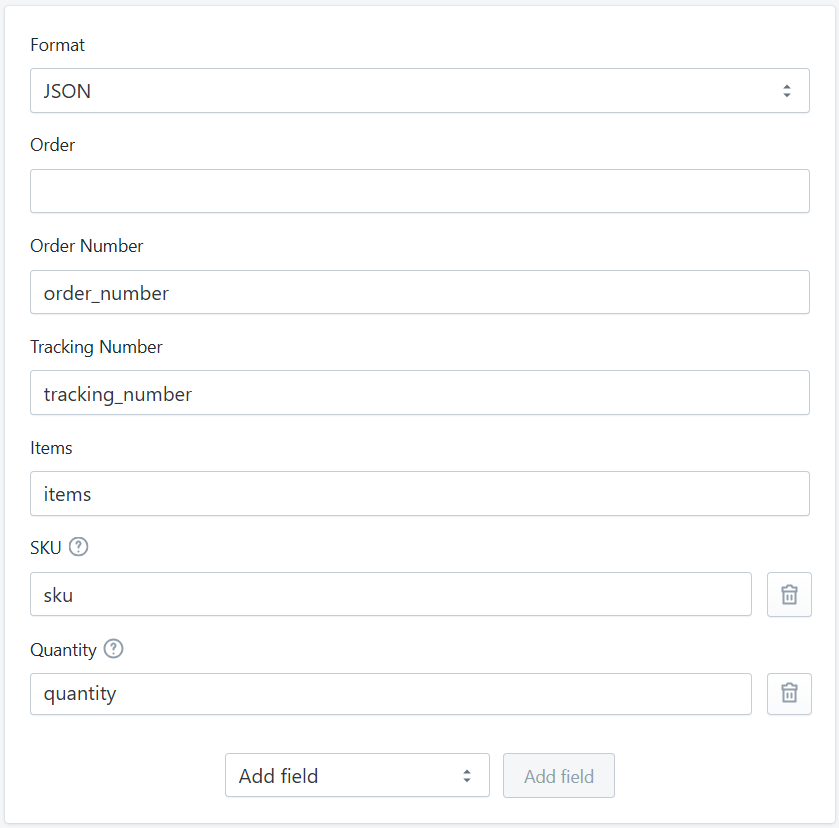
In this scenario, configure the following settings in the Data Mapping section:
Data Mapping section in Fulfilleo for JSON file
In scenarios where data retrieval is required from a field higher in the JSON hierarchy, you can utilize the variables `order` and `shipment`.
* `order`: contains details about a single order from the API
* `shipment`: contains details about a single shipment from the API (only available if the Shipment field is included in the Data Mapping section)
### Fulfill single orders
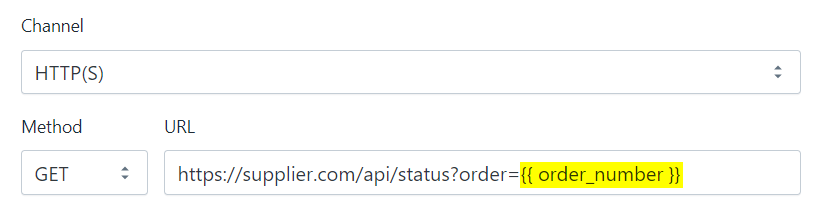
Some suppliers require the order number to be included in the URL when making a request. Fulfilleo supports these cases by iterating through all unfulfilled and partially fulfilled orders to check if the supplier has provided tracking data.
Order number variable in URL
You can include the following variables in the URL:
* `{{ order_number }}`
* `{{ order_id }}`
* `{{ order_email }}`
* `{{ order.metafields.. }}`
In this mode, you can utilize the `context` object in the Data Mapping section. The `context` object provides the following structure and contains key details about the order from Shopify:
```json
{
"order": {
"id": 1234567890123,
"created_at": "2025-01-01T00:00:00+01:00",
"email": "test@test.com",
"name": "#D1263",
"number": 263,
"order_number": 1263,
"tags": ""
},
"order_id": 1234567890123,
"order_name": "#D1263",
"order_number": 1263
}
```
Sometimes, the API response might not include the order number required in the **Data Mapping** section. In such cases, you can use `{{ context.order.order_number }}` or `{{ context.order_number }}` to provide the necessary order number.